Node.js API Guide 05 — 실전 감각 3종 세트 (검증/에러처리/간단 인증) | 0xccffff LogArticleNode.js API Guide 05 — 실전 감각 3종 세트 (검증/에러처리/간단 인증)
TutorialsFeb 20, 2026Views: 4Updated: 2026-02-24Tested: Node 24 LTS, Windows 11/posts/node-api-05-practical
nodejsapiexpressvalidationerror-handlingauthbeginner
Related posts
미션 해설을 핑계로 PATCH/DELETE를 추가해 CRUD를 완성합니다. req.params(주소창의 숫자), done 토글, 삭제까지 구현하고 PowerShell로 직접 테스트합니다.
지금까지 만든 API 서버 구조를 한 번에 정리하고, 초보자가 꼭 기억해야 할 실전 감각 3가지와 제작 비하인드를 전하며 시리즈를 마무리합니다.
TODO를 메모리 대신 todos.json 파일에 저장해, 서버를 재시작해도 데이터가 남도록 만듭니다.
GET/POST 요청으로 TODO API를 만들고, 브라우저와 PowerShell에서 JSON 응답을 확인합니다.
05 — 실전 감각 3종 세트 (검증/에러처리/간단 인증)#
이 글에서는 지금까지 만든 TODO API에 “실전에서 자주 필요한 기본기” 3가지를 붙입니다.
- 검증(Validation): 이상한 입력을 미리 막기
- 에러 처리(Error Handling): 문제가 생겨도 JSON으로 응답하기
- 간단 인증(Simple Auth): 아무나 POST 못 하게 잠금 걸기 (로컬 실습용)
Prerequisites
- 04편 완료 (todos.json 파일 저장까지 된 상태)
- 작업 폴더:
C:\Workspace\node-api
- Windows Terminal 기본 셸: PowerShell
0) 실습 준비 (이전 편과 동일)#
이전과 똑같이 서버를 켤 준비를 해줍니다.
기억이 잘 안 난다면 04. 파일 저장하기 (todos.json) 를 먼저 보고 와도 좋습니다.
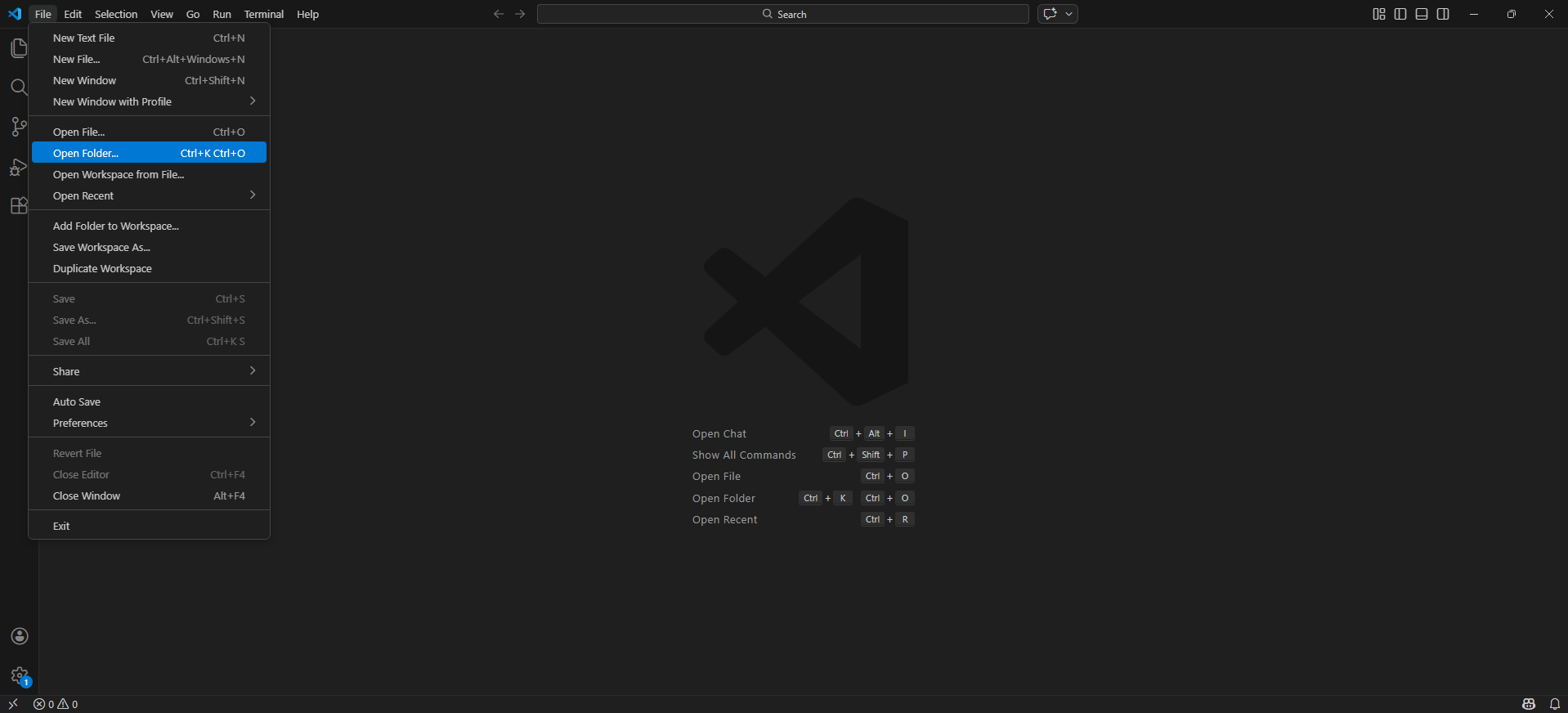
- VS Code에서 폴더 열기:
File > Open Folder... → C:\Workspace\node-api 선택
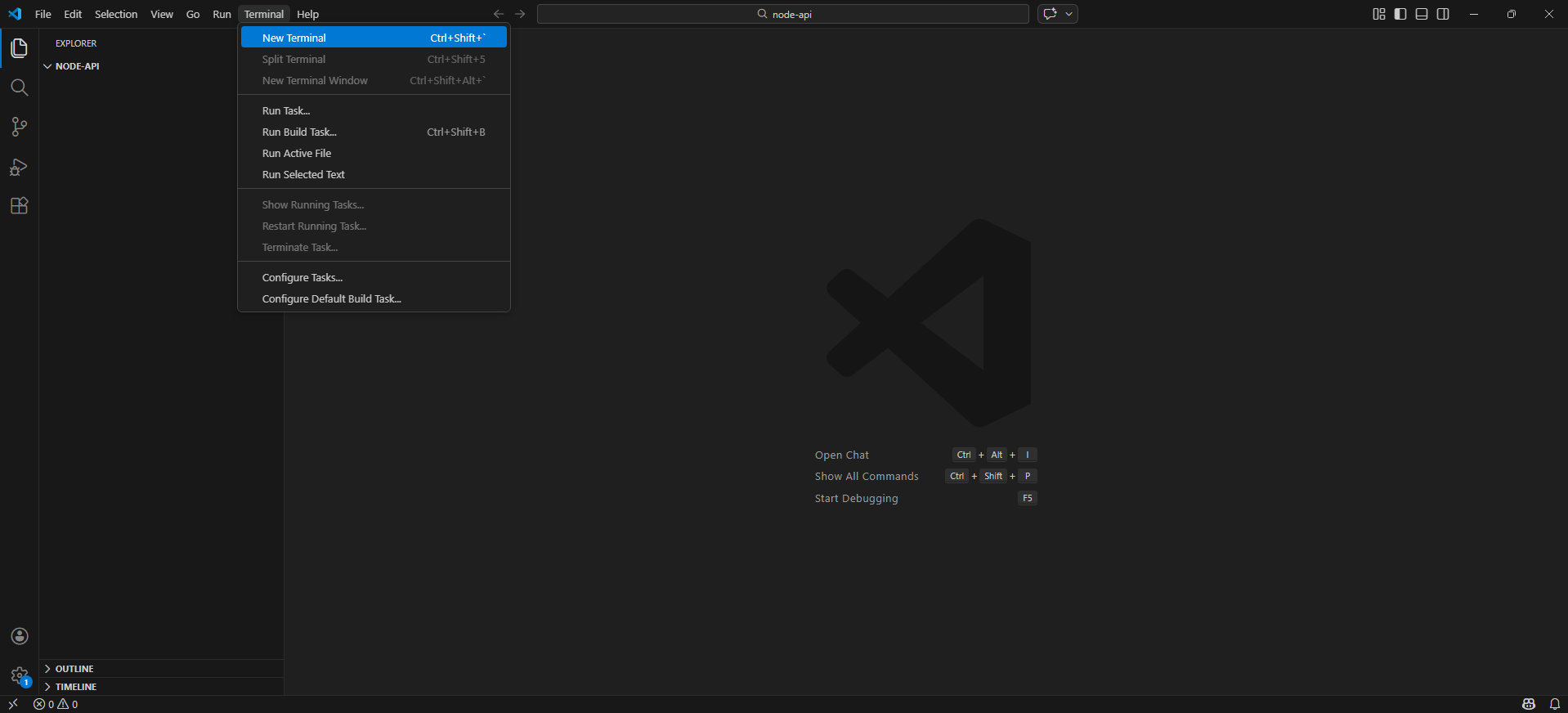
- 터미널 열기: VS Code 상단
Terminal > New Terminal
Tip
터미널에 pwd를 입력해서 현재 위치가 C:\Workspace\node-api가 맞는지 꼭 확인하세요.
pwd
1) 오늘 할 일 (3개)#
이번 편에서 바뀌는 점은 아래 3가지입니다.
- POST 요청은 간단 인증 키가 없으면 거절됩니다. (401)
- TODO 제목(
title)은 빈 값뿐 아니라 길이도 검사합니다. (400)
- 서버가 터지거나 없는 주소로 가도 JSON으로 응답합니다. (404/500)
2) server.js 수정하기 (검증/에러처리/간단 인증 추가)#
이번 편은 “기능이 1~2개씩 늘어나는 단계”라서, 추가되는 부분부터 보고 마지막에 전체 코드를 확인하는 흐름으로 갑니다.
(헷갈리면 맨 아래의 “최종 확인용 전체 코드”로 통째로 교체해도 됩니다)
2-0) 이번 편에서 추가되는 것 (6개)#
fail() : 실패 응답을 { ok: false, error: "..." } 형태로 통일API_KEY + requireApiKey : POST 요청에 “열쇠” 걸기- POST 검증 강화 :
title 빈 값 + 길이 제한(100자)
/debug/error : 500을 일부러 확인하는 연습용 엔드포인트- 404 폴백 : 없는 주소도 JSON으로 통일
- 500 에러 미들웨어 : 서버 예외도 JSON으로 통일
Note
상태 코드 빠른 정리#
| 코드 | 의미 | 언제 쓰나 |
|---|
| 200 | 성공 | GET 응답(기본) |
| 201 | 생성 성공 | POST로 새로 만들었을 때 |
| 400 | 잘못된 요청 | title이 없거나 너무 길 때 / JSON이 깨졌을 때 |
| 401 | 인증 실패 | API 키가 없거나 틀렸을 때 |
| 404 | 없는 주소 |
2-1) 실패 응답 형태 통일하기 (fail)#
res.status(...).json(...)를 매번 직접 쓰기 시작하면, 에러 응답 모양이 금방 들쑥날쑥해집니다.
그래서 “실패 응답”만 담당하는 함수 하나를 둡니다.
아래 코드를 saveTodosToFile 아래쪽(라우트들 위쪽)에 추가하세요.
function fail(res, status, error, extra) {
  const payload = { ok: false, error };

  // extra는 선택: 있으면 응답에 같이 섞어서 보냅니다.
  if (extra && typeof extra === "object") {
    Object.assign(payload, extra);
  }

  return res.status(status).json(payload);
Note
(잠깐) 이 코드가 하는 일 (3개만)#
status로 HTTP 상태 코드를 정하고 (400, 401 같은 거){ ok: false, error: "..." } 형태로 응답 모양을 고정하고- 필요하면
extra(힌트/예시)를 덧붙여서 같이 보냅니다.
2-2) 로컬 실습용 인증 키 + 미들웨어 만들기 (API_KEY, requireApiKey)#
이제 POST 요청에만 “열쇠”를 걸어봅니다.
키가 없거나 틀리면 401로 막히고, 맞으면 다음 단계로 넘어갑니다.
fail() 아래쪽에 추가하세요.
const API_KEY = "dev-secret";

function requireApiKey(req, res, next) {
  const key = req.header("x-api-key");

  if (key !== API_KEY) {
    return fail(res, 401, "unauthorized", {
      hint: 'Set header "x-api-key" to the correct value',
Note
(잠깐) 미들웨어가 뭐냐면#
app.post("/todos", requireApiKey, (req, res) => { ... }) 처럼 중간에 끼우는 함수입니다.requireApiKey가 먼저 실행되고, 통과하면 next()로 **다음 함수(진짜 라우트)**로 넘어갑니다.- 여기서
return fail(...)로 응답을 보내버리면, 뒤의 라우트는 실행되지 않습니다.
2-3) POST /todos에 인증 + 검증 붙이기#
기존 app.post("/todos", ...)를 아래처럼 바꿉니다.
핵심은 두 줄입니다.
- 라우트에
requireApiKey를 끼우고
title이 이상하면 400으로 돌려보내기
app.post("/todos", requireApiKey, (req, res) => {
  const title = req.body?.title;

  // 검증 1) 타입/빈 값
  if (typeof title !== "string" || title.trim().length === 0) {
    return fail(res, 400, "title is required", {
      example: { title:
Note
(잠깐) 이 코드가 하는 일 (3개만)#
requireApiKey가 먼저 실행되어, 키가 없으면 여기까지 오지도 못합니다. (401)title이 없거나 공백이면 400으로 막습니다.title이 너무 길면(100자 초과) 400으로 막습니다.
2-4) 500을 일부러 확인할 수 있게 만들기 (/debug/error)#
에러 처리가 제대로 붙었는지 확인하려면, 일부러 에러를 한 번 내보는 게 제일 빠릅니다.
아래 엔드포인트를 라우트들 근처에 하나 추가하세요.
app.get("/debug/error", (req, res) => {
  throw new Error("debug error");
});
Warning
/debug/error는 연습용입니다.
배포/공유할 때는 꼭 지우세요.
2-5) 없는 주소(404)도 JSON으로 응답하기 (not_found)#
모든 라우트 정의가 끝난 뒤, 맨 아래쪽에 404 폴백을 추가합니다.
app.use((req, res) => {
  return fail(res, 404, "not_found", { path: req.path });
});
Note
(잠깐) 이 코드가 하는 일#
등록된 라우트가 하나도 매칭되지 않으면, 마지막에 여기로 떨어집니다.
그래서 “하얀 화면” 대신 JSON으로 404를 돌려줄 수 있습니다.
2-6) 서버 예외(500)도 JSON으로 응답하기 (internal_error)#
맨 마지막에 “에러 미들웨어”를 추가합니다.
에러 미들웨어는 파라미터가 4개라서 Express가 자동으로 구분합니다.
app.use((err, req, res, next) => {
  console.error(err);

  // JSON 파싱이 깨진 경우(잘못된 JSON)
  if (err instanceof SyntaxError) {
    return fail(res, 400, "invalid_json");
  }

  return fail(res, 500, "internal_error");
Note
(잠깐) 에러 미들웨어는 파라미터가 4개입니다#
(err, req, res, next) 형태면 Express가 “에러 처리용”으로 인식합니다.- 라우트에서
throw가 나거나, 내부에서 에러가 발생하면 여기로 들어옵니다.
- 여기서 500을 JSON으로 바꿔서 응답합니다.
Note
최종 확인용 전체 코드#
위 내용을 모두 합친 server.js 전체입니다.
헷갈리면 아래 코드로 통째로 교체하고 다음 단계로 넘어가도 됩니다.
server.jsconst express = require("express");
const fs = require
Expected result
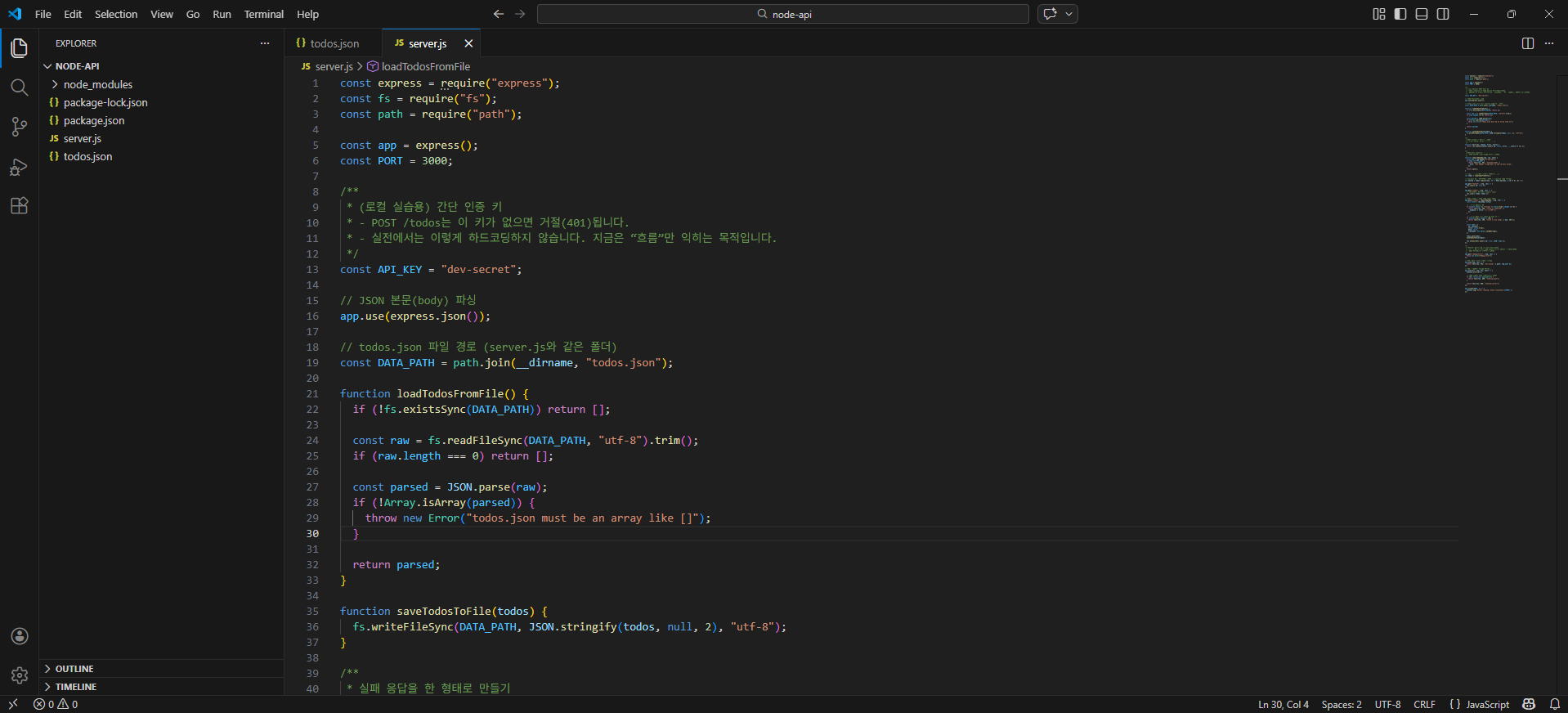
정상이라면 server.js에 아래가 들어가 있습니다.
API_KEY, requireApiKey (간단 인증)fail() (실패 응답 통일)title 길이 검증 (100자 제한)- 404 처리, 500 에러 처리
/debug/error (연습용)
3) 서버 재시작 (중요)#
Warning
중요: 코드를 수정했다면 서버를 껐다가 다시 켜야 반영됩니다.
- 서버가 켜져 있는 터미널에서
Ctrl + C
- 다시 실행:
node server.js
node server.js
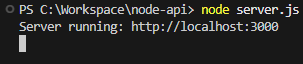
Expected result
정상이라면 Server running: http://localhost:3000가 출력됩니다.
Troubleshooting
서버가 시작하자마자 에러로 꺼져요#
자주 나오는 원인:
todos.json이 JSON 형식이 깨짐
server.js 저장이 안 됨
빠른 해결:
todos.json 내용을 []로 바꾸고 저장 → 서버 재시작
4) 인증 확인: 키 없이 POST 하면 막히기 (401)#
서버를 켜 둔 터미널은 실행 중이라 입력이 어렵습니다.
VS Code에서 Terminal → New Terminal로 터미널을 하나 더 열고, 그 새 터미널에서 테스트합니다.
키 없이 POST를 보내면 401이 나와야 합니다.
Invoke-RestMethod -Method Post -Uri "http://localhost:3000/todos" -ContentType "application/json" -Body '{ "title": "키 없이 추가" }'
Expected result
정상이라면 401(Unauthorized) 로 막힙니다.
여기서 나오는 빨간 글씨는 실패가 아니라 성공입니다.
우리가 의도적으로 만든 방어막(키 없으면 차단)이 제대로 작동했다는 뜻이에요.
- Windows PowerShell(5.1)은 4xx/5xx를 받으면
Invoke-RestMethod가 예외를 던지면서 빨간 글씨로 보여줍니다. (서버가 “망가졌다”는 의미가 아닙니다)
- 심지어 오류 메시지에 (401) Unauthorized 가 안 찍힐 수도 있어요.
- 대신 출력 내용에
error":"unauthorized" (그리고 종종 hint까지) 같은 unauthorized JSON 응답(body) 이 보이면 정상입니다.
- 서버 터미널은 계속 실행 중이어야 합니다. (
Server running: ...이 유지)
다음 5번에서 키를 붙이면 바로 201로 “성공”으로 바뀝니다.

Note
(선택) 401 + JSON 본문까지 보고 싶다면#
try/catch로 본문을 꺼낼 수 있습니다.
try {
  Invoke-RestMethod -Method Post -Uri "http://localhost:3000/todos" -ContentType "application/json" `
    -Body '{ "title": "키 없이 추가" }' -ErrorAction Stop
} catch {
  $res = $_.Exception.Response
  if ($res) {
5) 인증 성공: 헤더를 붙여 POST 하기 (201)#
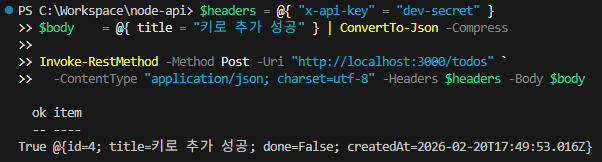
이번에는 요청에 헤더를 붙입니다.
$headers = @{ "x-api-key" = "dev-secret" }
$body    = @{ title = "키로 추가 성공" } | ConvertTo-Json -Compress

Invoke-RestMethod -Method Post -Uri "http://localhost:3000/todos" `
  -ContentType "application/json; charset=utf-8" -Headers $headers -Body $body
Expected result
정상이라면 ok: true와 함께 TODO가 생성됩니다.
Troubleshooting
키를 넣었는데도 401이 떠요#
대부분 헤더 이름/값 오타입니다.
- 헤더 이름은 정확히
x-api-key
- 값은 정확히
dev-secret
아래 명령을 그대로 실행해보세요.
$headers = @{ "x-api-key" = "dev-secret" }
$body    = @{ title = "재시도" } | ConvertTo-Json -Compress

Invoke-RestMethod -Method Post -Uri
6) 검증 확인: 너무 긴 title은 막히기 (400)#
아래처럼 title을 일부러 길게 보내봅니다.
# 일부러 title을 100자를 넘겨서(101자) 검증이 걸리는지 확인합니다.
$headers = @{ "x-api-key" = "dev-secret" }
$body    = @{ title = ("a" * 101) } | ConvertTo-Json -Compress

Invoke-RestMethod -Method Post -Uri "http://localhost:3000/todos" `
  -ContentType "application/json; charset=utf-8" -Headers $headers -Body $body
Expected result
정상이라면 400 응답이 나오고, title is too long 같은 메시지가 나옵니다.
- PowerShell에서는 400도 빨간 글씨 오류로 보일 수 있는데, 지금은 우리가 일부러 검증을 실패시킨 거라 정상입니다.
- 출력된 JSON(body)에
title is too long이 보이면 “길이 제한 방어”가 제대로 걸린 거예요.

Troubleshooting
검증이 안 걸리고 그냥 추가돼요#
코드가 반영되지 않은 경우가 대부분입니다.
- 서버를 끄기:
Ctrl + C
- 다시 켜기:
node server.js
- 다시 POST 테스트
7) 에러 처리 확인: 일부러 500 만들기 (/debug/error)#
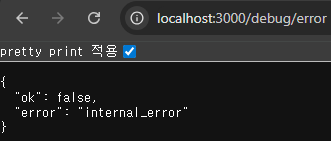
브라우저 주소창에 아래를 입력합니다.
http://localhost:3000/debug/error
Expected result
정상이라면 500 응답이 JSON으로 나옵니다.
{"ok":false,"error":"internal_error"}
그리고 터미널에는 에러 로그가 찍힙니다.
Troubleshooting
브라우저에 500 JSON이 안 뜨고 하얀 화면/다른 메시지가 떠요#
체크 순서:
- 서버가 켜져 있는지 확인 (
Server running: ...)
- 주소가 정확한지 확인 (
/debug/error)
- 코드 반영을 위해 서버 재시작 (
Ctrl + C → node server.js)
8) 없는 주소로 가면 404 (not_found)#
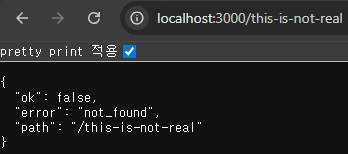
브라우저 주소창에 아래를 입력합니다.
http://localhost:3000/this-is-not-real
Expected result
정상이라면 404 응답이 JSON으로 나옵니다.
{"ok":false,"error":"not_found","path":"/this-is-not-real"}
다음 글#
에필로그는 따로 한 편으로 정리합니다.
다음 글: Epilogue
| 500 | 서버 에러 | 서버 코드에서 예외가 터졌을 때 |
}
});
}
return next();
}
"물 마시기"
},
});
}
// 검증 2) 길이 제한 (너무 긴 입력 방지)
if (title.trim().length > 100) {
return fail(res, 400, "title is too long", { max: 100 });
}
// ... (나머지는 04편과 동일합니다. 전체 코드는 아래 "최종 확인용" 참고)
});
});
(
"fs"
);
const path = require("path");
const app = express();
const PORT = 3000;
// JSON 본문(body) 파싱
app.use(express.json());
/**
* (로컬 실습용) 간단 인증 키
* - POST /todos는 이 키가 없으면 거절(401)됩니다.
* - 실전에서는 이렇게 하드코딩하지 않습니다. 지금은 흐름만 익히는 목적입니다.
*/
const API_KEY = "dev-secret";
// todos.json 파일 경로 (server.js와 같은 폴더)
const DATA_PATH = path.join(__dirname, "todos.json");
function loadTodosFromFile() {
// 파일이 없으면 빈 배열로 시작
if (!fs.existsSync(DATA_PATH)) return [];
// 1) 파일을 텍스트로 읽기
const raw = fs.readFileSync(DATA_PATH, "utf-8").trim();
// 파일이 비어있으면 빈 배열로 처리
if (raw.length === 0) return [];
// 2) 텍스트(JSON)를 JS 값(배열)로 변환
const parsed = JSON.parse(raw);
// 최소한의 형태 체크
if (!Array.isArray(parsed)) {
throw new Error("todos.json must be an array like []");
}
return parsed;
}
function saveTodosToFile(todos) {
// JS 값(배열)을 JSON 텍스트로 바꿔서 파일에 쓰기
fs.writeFileSync(DATA_PATH, JSON.stringify(todos, null, 2), "utf-8");
}
/**
* 실패 응답을 한 형태로 만들기
* - { ok: false, error: "...", ... }
*/
function fail(res, status, error, extra) {
const payload = { ok: false, error };
// extra는 선택: 있으면 응답에 같이 섞어서 보냅니다.
if (extra && typeof extra === "object") {
Object.assign(payload, extra);
}
return res.status(status).json(payload);
}
/**
* 간단 인증 미들웨어
* - 요청 헤더에 x-api-key가 있어야 합니다.
*/
function requireApiKey(req, res, next) {
const key = req.header("x-api-key");
if (key !== API_KEY) {
return fail(res, 401, "unauthorized", {
hint: 'Set header "x-api-key" to the correct value',
});
}
return next();
}
// 시작할 때 파일에서 읽어서 메모리로 올림
let todos = loadTodosFromFile();
// 저장된 TODO 중 가장 큰 id를 찾아서, 그 다음 번호부터 시작합니다.
let nextId = 1;
for (const t of todos) {
if (typeof t.id === "number" && t.id >= nextId) {
nextId = t.id + 1;
}
}
app.get("/health", (req, res) => {
res.json({ ok: true });
});
app.get("/todos", (req, res) => {
res.json({ items: todos });
});
// POST /todos - 하나 추가 (인증 필요)
app.post("/todos", requireApiKey, (req, res) => {
const title = req.body?.title;
// 검증 1) 타입/빈 값
if (typeof title !== "string" || title.trim().length === 0) {
return fail(res, 400, "title is required", {
example: { title: "물 마시기" },
});
}
// 검증 2) 길이 제한 (너무 긴 입력 방지)
if (title.trim().length > 100) {
return fail(res, 400, "title is too long", { max: 100 });
}
const todo = {
id: nextId++,
title: title.trim(),
done: false,
createdAt: new Date().toISOString(),
};
todos.push(todo);
saveTodosToFile(todos);
res.status(201).json({ ok: true, item: todo });
});
/**
* (연습용) 강제로 에러를 내는 엔드포인트
* - 일부러 에러를 내서 500 응답이 어떻게 나오는지 확인합니다.
* - 실전 배포에서는 제거해야 합니다.
*/
app.get("/debug/error", (req, res) => {
throw new Error("debug error");
});
// 404: 없는 주소는 여기로 떨어짐
app.use((req, res) => {
return fail(res, 404, "not_found", { path: req.path });
});
// 500: 서버에서 예외가 터졌을 때
app.use((err, req, res, next) => {
console.error(err);
// JSON 파싱이 깨진 경우(잘못된 JSON)
if (err instanceof SyntaxError) {
return fail(res, 400, "invalid_json");
}
return fail(res, 500, "internal_error");
});
app.listen(PORT, () => {
console.log(`Server running: http://localhost:${PORT}`);
});
"HTTP $([int]$res.StatusCode)"
$reader = New-Object System.IO.StreamReader($res.GetResponseStream())
$raw = $reader.ReadToEnd()
$raw
} else {
throw
}
}
"http://localhost:3000/todos"
`
-ContentType "application/json; charset=utf-8" -Headers $headers -Body $body